
The Wedding Budget That Doesn’t Go Over: Track Three Numbers, Not One
Most wedding budgets are a single column of numbers written in the first month. By the fourth month it's fiction: the venue quote came in higher, the florist's “from” price didn't include delivery, and the dress alterations were never on the list. The couple finds out how far over they are when the final invoices arrive — which is the one moment when nothing can be changed.
The fix is not a stricter budget. It's tracking the right three numbers for every line, and putting a limit on each category so the overrun shows up at the quote stage, when you can still say no.
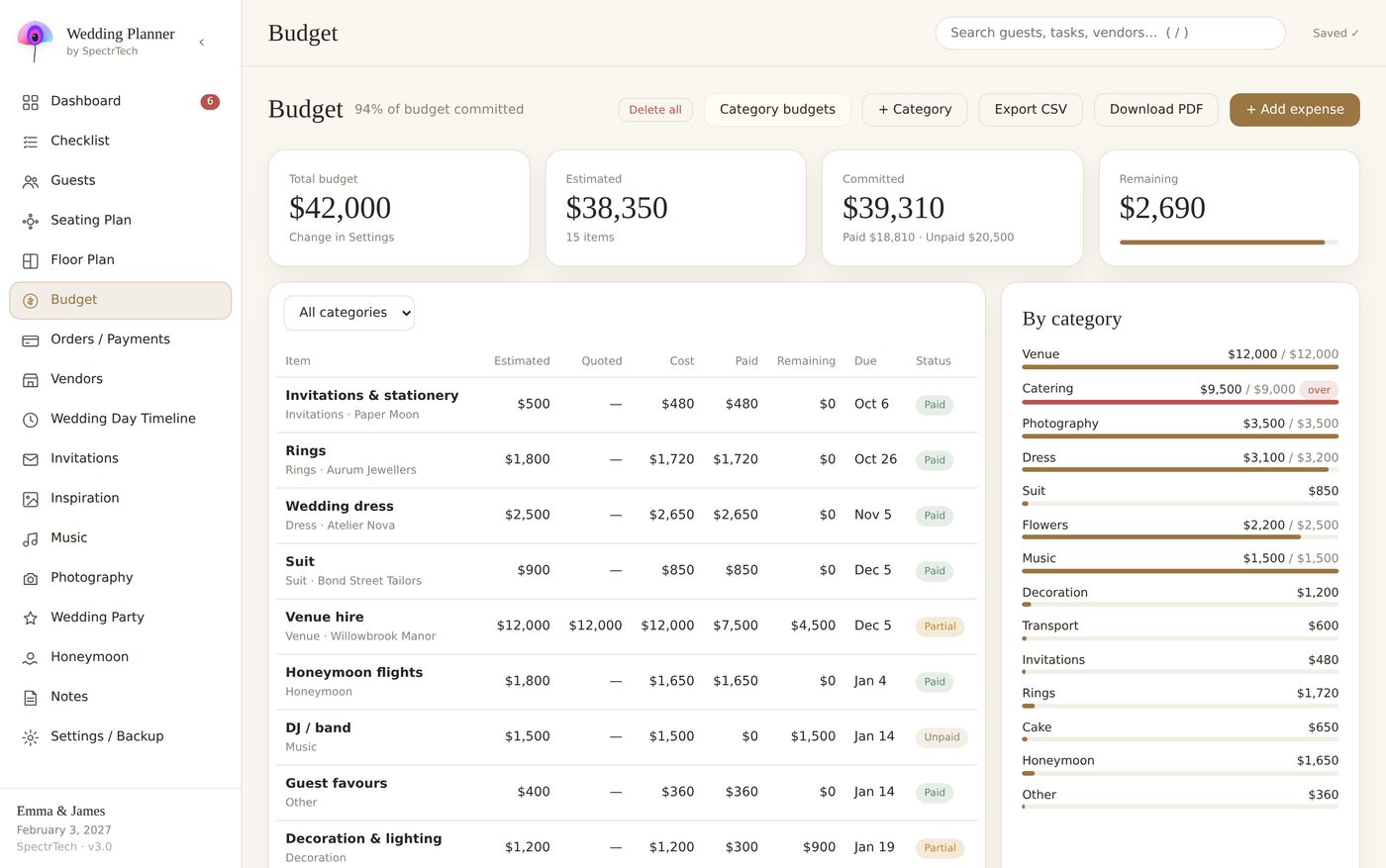
Estimated, quoted, final: the three numbers every wedding cost has
Estimated is what you think it will cost when you write the budget. It's a guess, and it should be — a rough, honest number based on a few searches and one or two phone calls.
Quoted is what a specific vendor has told you in writing. This is the moment the number becomes real, and the moment most couples don't write it down — they “know” the quote, so the spreadsheet keeps showing the estimate.
Final is what you actually paid, including the extras: delivery, service charge, overtime, the second tasting, the last-minute additions.
The gap between estimated and quoted is where your budget slips. The gap between quoted and final is where vendors' extras hide. If you track only one number, you can't see either gap until it's too late.
Category limits: the alarm that fires early
A total budget of, say, 36,000 tells you nothing about a 9,500 catering quote — is that fine or not? Split the total into categories with a limit each, and the answer is immediate: catering's limit is 9,000, the quote is 9,500, you're 500 over before signing. Now you have options: negotiate, drop the late-night snack, or take 500 from decoration. On the invoice, you'd have none of those.
A typical split for a reception-heavy wedding (adapt it — this is a method, not a rule):
| Category | Share | What's usually forgotten inside it |
|---|---|---|
| Venue & catering | 40–50% | service charge, corkage, overtime, staff meals |
| Photography & video | 10–12% | second shooter, albums, travel |
| Attire & beauty | 8–10% | alterations, shoes, trial hair and makeup |
| Flowers & decoration | 8–10% | delivery, setup, teardown |
| Music & entertainment | 5–8% | equipment hire, overtime |
| Stationery | 2–3% | postage, RSVP cards, day-of signage |
| Rings | 3–5% | resizing, engraving |
| Transport, gifts, favours | 3–5% | vendor tips |
| Contingency | 5–10% | everything above that you didn't expect |
The contingency line is not optional. Every wedding has 5–10% of costs that nobody planned; naming the line makes them visible instead of shocking.
Payments: the second budget
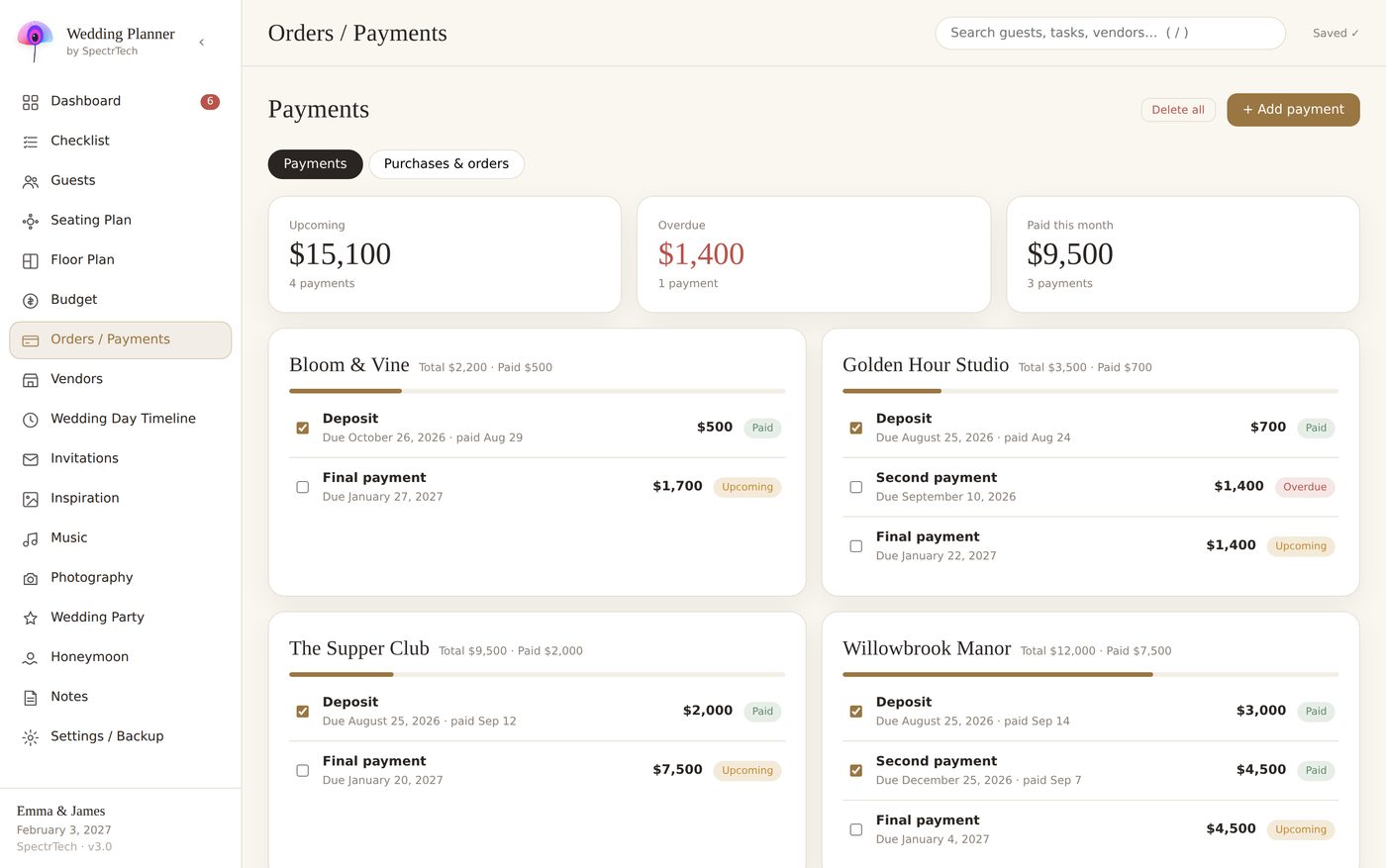
The budget tells you what things cost. It doesn't tell you when you'll pay, and that's where cash flow bites: three deposits in one month, two final balances due the same week as the honeymoon. Keep a separate payment schedule per vendor — deposit, instalments, balance, each with a due date — and look at it weekly for the last two months.
How to run it, week by week
- Write the estimated column once, with a category limit for each block. Don't polish it.
- Every time a quote arrives, enter it the same day, next to the estimate. If a category goes over its limit, decide right then: accept, negotiate, or rebalance from another category.
- When you choose a vendor, create the payment schedule from the quote — deposit date, balance date, delivery date.
- Enter every final invoice as paid, with the real total, and glance at the remaining column: it's the only number that tells you how the whole wedding is doing.
- Keep one “extras” line per category for the small things. Ten small things are one big thing.
Where a wedding budget spreadsheet falls down
A spreadsheet handles three columns fine. Where it breaks is the links: the vendor you picked lives on one sheet, the budget line on another, the payment schedule on a third, and nothing updates the others. Change the florist, and you have three places to edit. Miss one, and the dashboard lies.
The planner we build does this differently: choosing a vendor creates the budget line and the payment schedule, category limits are set once and checked on every quote, and the dashboard shows committed, paid and remaining from the same data. It's one file, so there's nothing to sync.
Wedding Planner by SpectrTech — one offline HTML file, 17 connected sections, 9 languages. No account, no subscription. $24.99 one-time.
See the planner on Gumroad
The honest summary
You will go over somewhere. The goal isn't a perfect forecast; it's knowing which category went over, when it happened, and what you traded to fix it — while the decision is still yours to make.