
How to Make a Wedding Seating Chart Without Redoing It Ten Times
“I redid ours like ten times.” That is the most common sentence in every seating-chart thread, and the reason is always the same: people start by placing names at tables, and only discover the constraints while doing it. Aunt at table 3 — oh, but she can't be near the uncle at table 4. Move him. Now his kids are at a different table from him. Move them. Now table 5 has one seat left and a couple to place.
The fix is to reverse the order. Collect every constraint first, as tags on the guest list, and only then place anyone. Below is the method, followed by the specific situations that cause the most trouble.
Step 1: finish the guest list before you touch a table
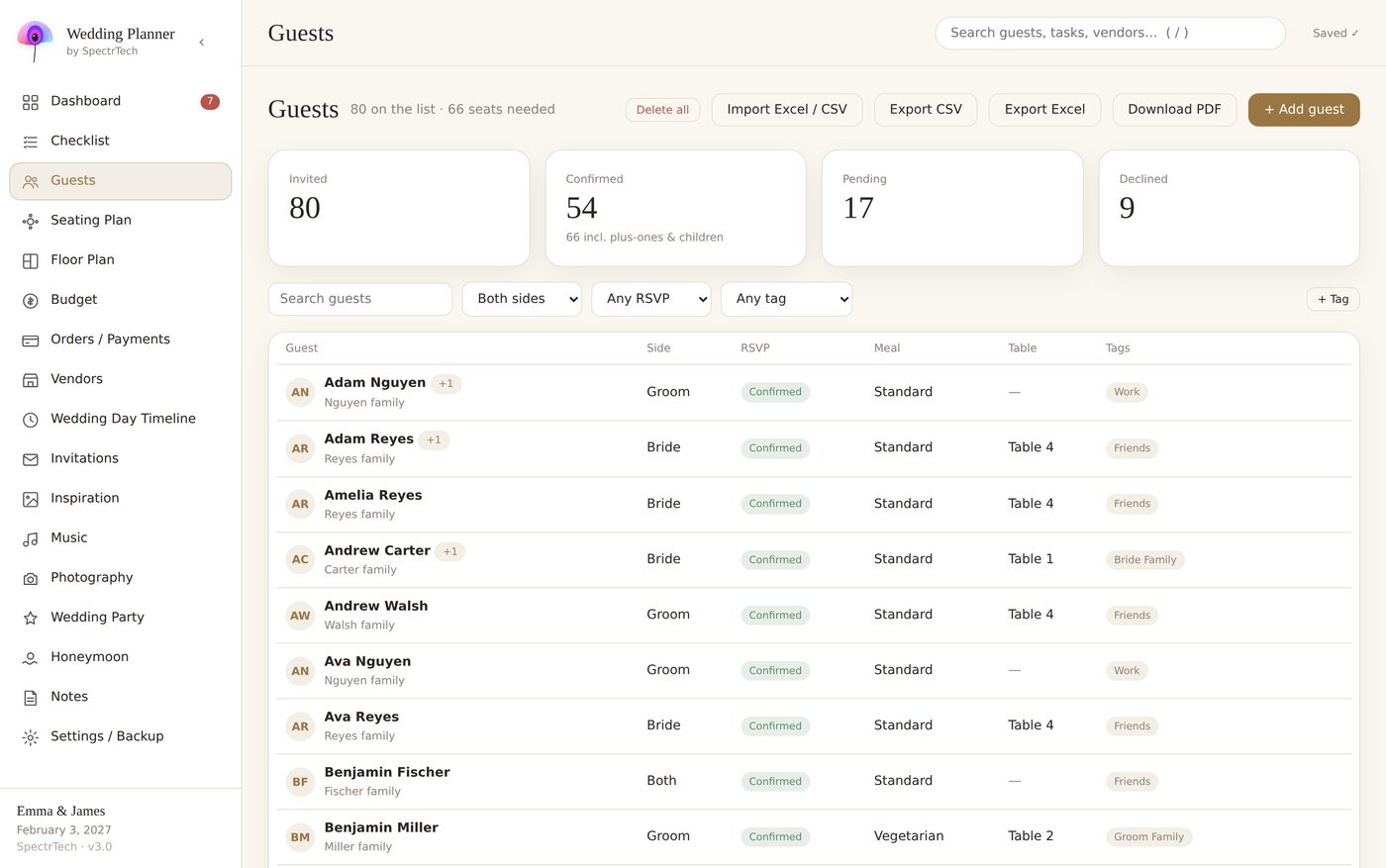
A seating chart is only as good as the list underneath it. Before you draw a single table, every confirmed guest needs:
- A group — the family or friend cluster they belong to (“Carter family”, “college friends”, “James's work”).
- Side — bride, groom or both.
- Plus-one and kids — as actual people, not a note. A “+1” is a chair; two kids are two chairs (or a kids' table).
- Tags for rules — at minimum: “VIP” (people who must have the best view), “keep together” and “keep apart”.
If your list is in a spreadsheet, add those as columns now. In our planner these are fields on the guest card, and the seating plan reads them directly.
Step 2: decide the table layout from the room, not from the list
Ask the venue for the room dimensions and the table sizes they own. Round tables of 8 or 10 are the norm; long tables seat more per square metre but make conversation across the table harder. Draw the room first: dance floor, stage or band, bar, entrance and the sweetheart or top table. Then count how many tables fit with space to walk between them — that number, times seats per table, is your real capacity. If it is smaller than your guest count, you have a venue problem, not a seating problem.
Step 3: place groups, not people
Work in this order:
- Top table or sweetheart table. Decide whether you sit alone as a couple, with the wedding party, or with parents. This one choice removes the most political question from every other table.
- Immediate family. Parents, siblings, grandparents — closest to the top table, best view.
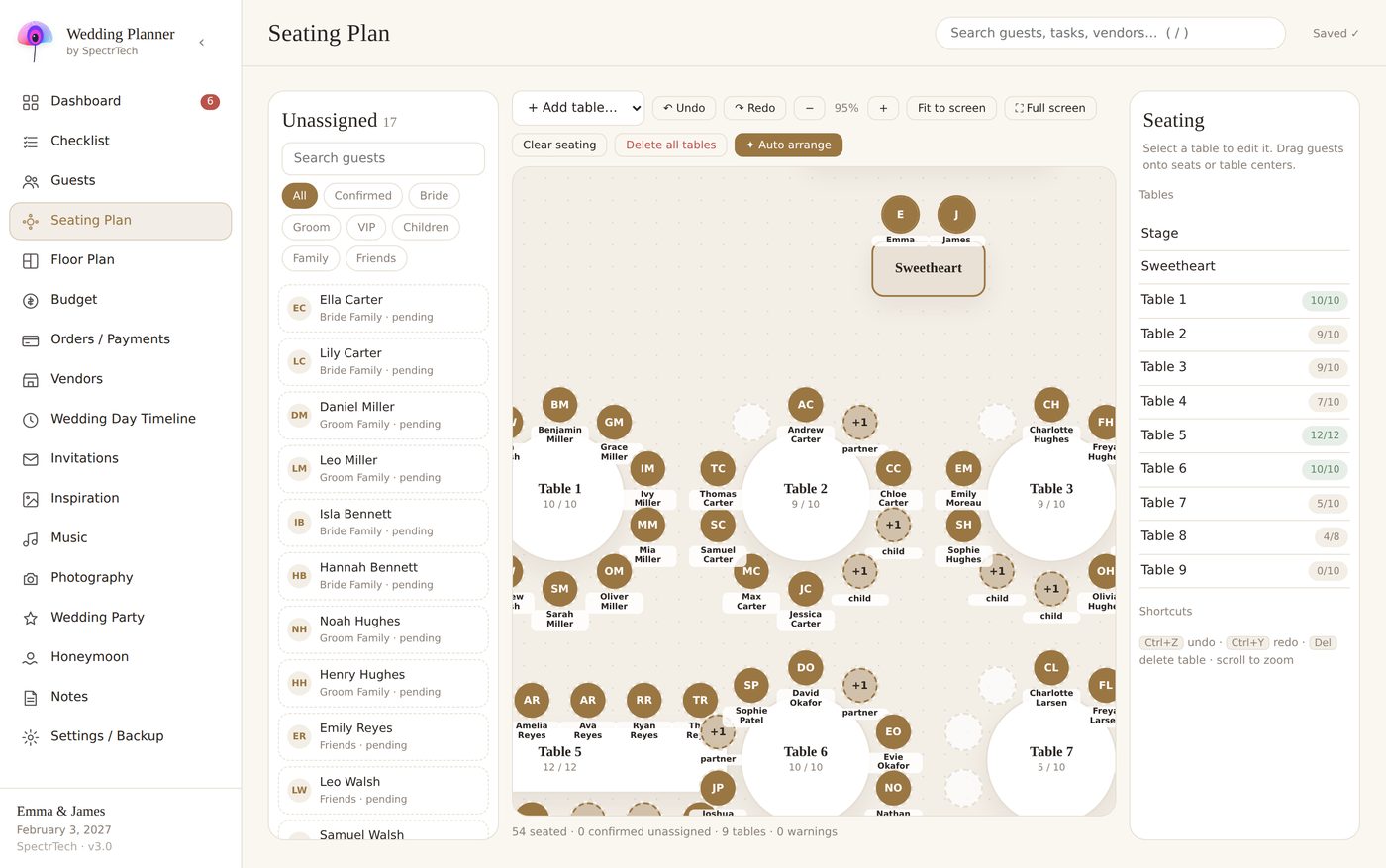
- Whole groups. Drop each tagged group onto a table as a unit. A group of 9 goes to a table of 10 with one seat to spare, not split across two tables.
- Only then, individuals. Singles, plus-ones you've never met, the one colleague — these fill the gaps, seated with the group they're closest to.
If you tag groups properly, this step is mechanical. It's also exactly what an auto-arrange function does: ours seats whole groups first, balances sides across tables, keeps “keep together” pairs adjacent and refuses to put “keep apart” pairs at the same table. Then you drag to taste.
Step 4: check the chart against the rules, not against your memory
After the first draft, walk the list — not the tables — and ask for each guest: is this person next to someone they know? Is anyone from a “keep apart” pair at the same table? Are the kids near their parents? Is any table all singles who've never met? Is any table a mix of two families who have no connection? A chart is finished when the list passes, not when the tables look full.
The hard cases: divorced parents, exes, kids and singles
Divorced parents. Give each parent their own table with their own partner and their own side of the family, both equally close to the top table. Do not seat them together “for the photos” unless they have told you, unprompted, that they're fine with it.
Exes and feuds. A “keep apart” tag, and different tables on different sides of the dance floor. Don't announce the rule to anyone; it just quietly holds.
Kids. Under about seven, seat them with their parents and give the table extra room. Older kids often prefer a kids' table near — not next to — their parents. Whatever you decide, count every child as a chair and tell the caterer their meal counts separately.
Plus-ones you don't know. Seat them with their partner's group; never split a couple to “balance” a table.
The table of leftovers. Every chart ends with six people who don't fit anywhere. Instead of a leftover table, place them one at a time at tables with a common thread — same city, same age, same hobby — and check that each has at least one person they've talked to before.
Seating chart tools: what a spreadsheet can and can't do
A spreadsheet can hold the chart, and for 40 guests that's fine. Where it fails is at 100+: cells don't know that “Sarah Carter” is a Carter, that she's next to her ex, or that her two kids need chairs. Every rule lives in your head, and every change means re-checking every rule by eye. That's the “ten times”.
Dedicated seating tools fix this by attaching the rules to the guest. If you go that route, look for three things: guests are dragged onto chairs, not typed into cells; family groups and keep-apart rules are respected automatically; and the seating chart is connected to the same list you use for RSVPs and meals, so a late decline doesn't leave a ghost at table 6.
Wedding Planner by SpectrTech — one offline HTML file, 17 connected sections, 9 languages. No account, no subscription. $24.99 one-time.
See the planner on Gumroad
Before you send it to the venue
Export or print two things: the seating chart by table (for the venue and the escort cards) and the guest list by name with the table number (for the person at the door). Send both a week ahead. And keep one printed copy in the emergency kit — the day something goes wrong with a phone is the day you'll need it.